





1. Introduction to CAT AVR
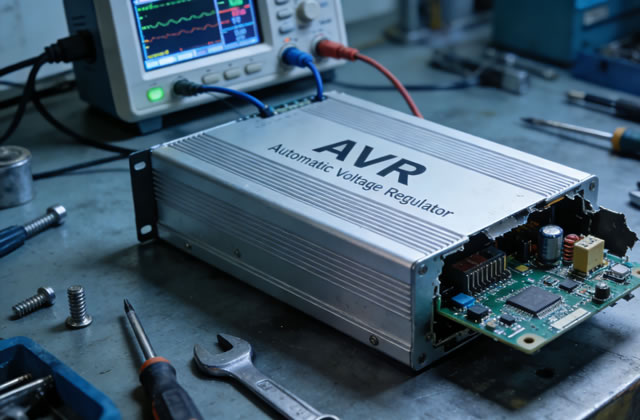
The CAT Automatic Voltage Regulator (AVR) is a critical electronic component integrated into Caterpillar diesel and gas generators. Its core function is to stabilize output voltage by adjusting the excitation current of the generator’s rotor, ensuring consistent, safe, and reliable power supply for industrial, commercial, and residential applications.
CAT AVRs are engineered for heavy-duty operation, but prolonged use, environmental factors, electrical surges, and lack of maintenance can lead to performance degradation, voltage fluctuations, or complete failure. Regular maintenance and timely repair are essential to extend service life, prevent unplanned downtime, and protect connected electrical equipment.
2. Key Functions of CAT AVR
- Maintain stable output voltage (±1% deviation) under varying load conditions
- Protect generators from overvoltage, undervoltage, and overexcitation faults
- Provide soft start function for generator excitation system
- Compensate for voltage drops caused by load changes and line losses
- Interface with generator control modules for remote monitoring and alarm notifications
- Stabilize voltage during transient load spikes (e.g., motor starting)
3. Routine Maintenance Schedule for CAT AVR
Adhere to the following maintenance schedule to maximize the lifespan of your CAT AVR and avoid unexpected failures:
| Maintenance Frequency | Tasks |
|---|---|
| Weekly Inspection | Visual check for physical damage, abnormal noise, or overheating; monitor output voltage stability |
| Monthly Maintenance | Clean external surfaces; check wiring connections for looseness; verify alarm indicators |
| Quarterly Maintenance | Test voltage regulation accuracy; tighten terminal screws; inspect cooling vents for blockages |
| Annual Overhaul | Full internal cleaning; component testing; capacitor replacement; firmware update (if applicable) |
4. Step-by-Step Maintenance Procedures
4.1 External Cleaning & Visual Inspection
- Power off the generator and lock out/tag out the power source to prevent accidental startup
- Use a dry, lint-free cloth or compressed air (low pressure) to remove dust, dirt, oil, and debris from the AVR exterior
- Inspect the AVR casing for cracks, corrosion, burn marks, or water damage
- Check cable glands and seals for wear; replace damaged seals to prevent moisture ingress
- Verify all LED indicators are functional and free from discoloration
4.2 Wiring & Connection Inspection
- Inspect all input/output wiring for fraying, cracking, or heat damage
- Tighten terminal block screws to the manufacturer-specified torque (typically 1.2-1.5 Nm)
- Check for loose, corroded, or oxidized connectors; clean contacts with electrical contact cleaner if needed
- Ensure grounding wires are securely connected and corrosion-free
- Confirm no wires are touching hot components or sharp edges
4.3 Internal Maintenance (Qualified Technicians Only)
- Discharge all capacitors using a proper discharge tool (critical for safety)
- Remove the AVR cover carefully to avoid damaging internal circuit boards
- Clean the PCB (Printed Circuit Board) with isopropyl alcohol and a soft brush; remove dust and oxidation
- Inspect solder joints for cold joints, cracks, or burns; re-solder faulty connections
- Check cooling fans (if equipped) for smooth operation; lubricate bearings if required
- Inspect heat sinks for dust buildup; clean to ensure proper heat dissipation
4.4 Performance Testing
- Reconnect the AVR and restore power to the generator
- Start the generator and measure output voltage with a multimeter under no-load and full-load conditions
- Verify voltage stabilizes within the rated range (typically 380V/400V/480V three-phase)
- Test overvoltage/undervoltage protection functions by simulating minor voltage fluctuations
- Record test data for future comparison and maintenance tracking
5. Common CAT AVR Faults & Repair Solutions
| Fault Symptom | Possible Causes | Repair Actions |
|---|---|---|
| No output voltage / Zero voltage | Blown fuse, damaged diode, faulty excitation coil, loose wiring | Replace fuse, test diodes, repair excitation coil, resecure connections |
| Unstable / Fluctuating voltage | Potentiometer wear, capacitor leakage, loose connectors, load imbalance | Calibrate potentiometer, replace faulty capacitors, balance electrical load |
| Overvoltage (exceeds rated value) | Defective voltage sensor, faulty regulator IC, shorted SCR/TRIAC | Replace sensor module, repair control circuit, replace shorted components |
| Undervoltage (below rated value) | Insufficient excitation current, worn brushes, open circuit in rotor | Adjust excitation current, replace generator brushes, repair rotor winding |
| AVR overheating / Burn smell | Blocked vents, overloaded generator, faulty heat sink, short circuit | Clean cooling system, reduce load, replace heat sink, fix short circuits |
| Alarm indicators constantly on | Component failure, firmware error, overcurrent protection trigger | Troubleshoot faulty parts, reset AVR, update control firmware |
6. Component Replacement Guidelines
- Capacitors: Replace electrolytic capacitors every 3-5 years (even if functional) to prevent leakage and failure
- Fuses & Diodes: Only use CAT-specified replacement parts with matching voltage and current ratings
- PCB Assembly: Replace the entire circuit board if multiple components are damaged or burn marks are present
- Connectors & Wiring: Use high-temperature, oil-resistant wires for replacements to match OEM standards
- Calibration: Recalibrate the AVR after any component replacement to ensure accurate voltage regulation
7. Environmental Protection for CAT AVR
The operating environment directly impacts the reliability and lifespan of CAT AVR. Follow these environmental requirements:
- Operating temperature: -10°C to +50°C (14°F to 122°F)
- Relative humidity: 5% to 95% (non-condensing)
- Install in a dust-free, vibration-free, and waterproof enclosure
- Average exposure to corrosive gases, salt spray, and oil mist
- Ensure adequate ventilation for heat dissipation; avoid direct sunlight
8. Troubleshooting Flowchart Summary
- Confirm generator engine is running at rated speed (AVR requires stable engine speed for voltage control)
- Check input power supply to AVR and all wiring connections
- Test fuses, diodes, and capacitors for damage
- Calibrate voltage adjustment potentiometer
- Inspect generator rotor, stator, and brush assembly
- Replace faulty AVR components or entire unit if irreparable
- Conduct full load test and verify stable voltage output
9. Long-Term Service Life Extension Tips
- Implement a preventive maintenance program and document all service activities
- Use surge protectors to shield the AVR from lightning strikes and electrical surges
- Avoid continuous overloading of the generator beyond rated capacity
- Store spare CAT AVR units in a dry, temperature-controlled environment
- Update AVR firmware regularly to access latest performance improvements
- Train on-site staff to perform basic inspections and identify early warning signs
10. Conclusion
The CAT Automatic Voltage Regulator is the heart of generator voltage control, and its proper maintenance is non-negotiable for uninterrupted power generation. By following the routine maintenance schedule, conducting regular inspections, and performing timely repairs, you can ensure your CAT AVR operates at peak efficiency, minimize downtime, reduce operational costs, and extend the service life of your Caterpillar generator.
For complex faults or if you are unsure about repair procedures, always contact authorized CAT service technicians to avoid further damage to the AVR and generator system.

