






1. Overview of Jenbacher Control Module
The Jenbacher Control Module (JCM) is the core component of Jenbacher gas engine systems, responsible for monitoring, controlling, and regulating all critical engine operations including fuel supply, ignition timing, load management, and fault diagnosis. Proper maintenance of the JCM ensures optimal engine performance, extended service life, and compliance with safety standards.
Key functions of the JCM include:
- Real-time data acquisition from engine sensors (temperature, pressure, vibration, etc.)
- Closed-loop control of fuel injection and ignition systems
- Fault detection, logging, and alarm generation
- Communication with external monitoring systems (SCADA, PLC)
- Calibration and parameter adjustment for different operating conditions
2. Preventive Maintenance Schedule
| Maintenance Task | Frequency | Responsible Personnel | Key Notes |
|---|---|---|---|
| Visual inspection of JCM housing | Daily (before startup) | Operator | Check for physical damage, moisture, or loose connections |
| Cleaning of cooling vents and filters | Weekly | Maintenance Technician | Use compressed air (max 5 bar) to remove dust and debris |
| Electrical connection tightness check | Monthly | Certified Electrician | Torque to manufacturer’s specifications (8-10 Nm for terminal screws) |
| Software version check and update | Quarterly | Jenbacher Certified Engineer | Ensure compatibility with engine firmware |
| Calibration of sensor inputs | Semi-annually | Jenbacher Certified Engineer | Use calibrated test equipment; document results |
| Full functional test and diagnostic scan | Annually | Jenbacher Service Team | Test all I/O channels, communication protocols, and fault response |
| Replacement of backup battery | Every 2 years | Jenbacher Service Team | Prevent loss of configuration data during power outage |
| Complete module inspection (internal) | Every 5 years | Jenbacher Factory Service | Check for capacitor degradation, PCB damage, or corrosion |
3. Step-by-Step Maintenance Procedures
3.1 Visual Inspection & Cleaning
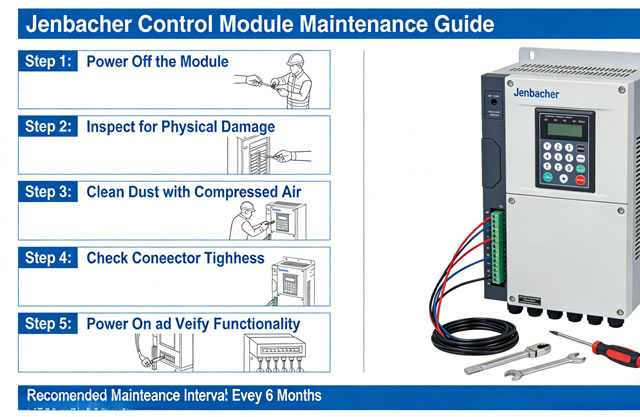
- Ensure the engine is shut down and the JCM is disconnected from power (lockout/tagout procedure must be followed).
- Inspect the exterior of the JCM for:
- Cracks or damage to the enclosure
- Signs of water ingress or corrosion
- Loose or damaged cable glands
- Overheating marks (discoloration) on the housing
- Clean the cooling vents and heat sinks using dry compressed air (5 bar max) to prevent overheating.
- Wipe the exterior with a lint-free cloth dampened with isopropyl alcohol (avoid harsh chemicals).
3.2 Electrical Connection Inspection
- Remove the JCM cover (follow manufacturer’s torque specifications for cover bolts).
- Inspect all terminal blocks for:
- Loose wires or terminals
- Corrosion or oxidation (white/green/black deposits)
- Burn marks or melted insulation
- Retighten loose terminals to the specified torque (8-10 Nm).
- Clean corroded terminals with a brass brush and apply anti-corrosion grease (Jenbacher part no. J620012).
- Replace any damaged wires, terminals, or connectors (use only genuine Jenbacher spare parts).
3.3 Software Maintenance & Updates
- Back up the current JCM configuration (critical parameters, calibration data, fault logs) to a secure storage device.
- Download the latest firmware/software from the official Jenbacher Service Portal (authenticated access required).
- Connect a certified Jenbacher service laptop to the JCM via the dedicated service port (Ethernet or RS485).
- Run the Jenbacher Service Tool (JST) and initiate the software update process.
- Do not interrupt power during the update (allow 10-15 minutes for completion).
- After update, verify the software version and restore the backed-up configuration.
- Perform a test run of the engine to confirm all functions operate correctly.
3.4 Backup Battery Replacement
- Identify the backup battery compartment (located inside the JCM enclosure, typically a 3.6V lithium battery).
- Disconnect the battery connector (note polarity: red = positive, black = negative).
- Remove the old battery and replace with a genuine Jenbacher battery (part no. J987045).
- Reconnect the battery (ensure correct polarity to avoid damage to the memory module).
- Verify the battery voltage (3.5-3.7V) using a multimeter.
- Update the battery replacement record in the maintenance log.
4. Troubleshooting Common Issues
| Symptom | Possible Cause | Resolution | |
|---|---|---|---|
| JCM fails to power on | Power supply failure, blown fuse, or dead backup battery | Check input voltage (24V DC), replace fuse (5A slow-blow), test/replace backup battery | |
| Intermittent sensor readings | Loose connections, damaged wiring, or electromagnetic interference | Retighten terminals, inspect wiring for damage, shield sensitive cables | |
| Communication loss with external systems | Incorrect protocol settings, faulty Ethernet/RS485 port, or firewall restrictions | Verify communication parameters, test port functionality, check network settings | |
| Frequent fault alarms (false positives) | Outdated software, incorrect calibration, or sensor drift | Update software, recalibrate sensors, replace faulty sensors | |
| JCM overheating | Clogged cooling vents, failed fan, or ambient temperature exceeding 50°C | Clean vents, replace fan, improve ventilation in the control room |
5. Safety Guidelines
- Always perform lockout/tagout (LOTO) procedures before working on the JCM to isolate power sources.
- Use only genuine Jenbacher spare parts and tools to avoid compatibility issues.
- Do not modify the JCM hardware or software without authorization from Jenbacher technical support.
- Ensure the JCM is protected from extreme temperatures (-20°C to +60°C), humidity (>85%), and corrosive environments.
- All maintenance personnel must be trained and certified by Jenbacher or authorized partners.
- Document all maintenance activities, including dates, tasks performed, parts replaced, and test results.
6. Documentation & Record-Keeping
Maintain a comprehensive maintenance log for the JCM, including:
- Date and time of each maintenance task
- Name and certification of the technician
- Details of tasks performed (inspection, cleaning, calibration, replacement)
- Results of tests and calibrations
- List of spare parts used (part numbers and serial numbers)
- Any issues identified and corrective actions taken
- Next scheduled maintenance date
7. Contact Jenbacher Technical Support
If you encounter issues beyond routine maintenance (e.g., hardware failure, software corruption, or unresolvable faults), contact Jenbacher technical support:
- 24/7 Service Hotline: +43 7229 200 0
- Email: [email protected]
- Online Portal: https://service.jenbacher.com
When contacting support, provide the following information: JCM model number, serial number, software version, engine type, and detailed description of the issue (including fault codes, timestamps, and operating conditions).